
Magic Link Authentication
A "magic link" is a passwordless authentication method that provides a secure, frictionless login experience. Instead of entering a password, users receive a unique, time-sensitive link via email that automatically logs them in when clicked.
Why Use Magic Links?
Benefits
✅ Improved Security: No passwords to steal, reuse, or forget
✅ Better User Experience: One-click login without password entry
✅ Reduced Support Burden: Eliminates "forgot password" flows
✅ Email Verification: Confirms email ownership as part of authentication
✅ Phishing Resistance: Time-limited, one-time links are harder to exploit
Common Use Cases
- Primary Authentication: Replace traditional username/password login
- Email Verification: Verify user email addresses during signup
- Password Reset: Secure alternative to traditional password reset flows
- Secure Actions: Confirm sensitive operations (account changes, purchases)
- Guest Access: Temporary access without account creation
Implementation Overview
This guide demonstrates how to implement a secure magic link flow using DyLy's JWT links with the OAuth 2.0-style authorization code flow.
Architecture
The magic link flow involves these components:
- Frontend Client: Where the user initiates login (web app, mobile app)
- Backend Server: Creates and validates links, manages user sessions
- DyLy Service: Generates secure JWT links and handles redirection
- Email Service: Delivers the magic link to the user
Security Features
This implementation includes:
- ✅ JWT signatures for tamper-proof links
- ✅ Authorization code flow (not exposing JWTs directly)
- ✅ PKCE for public clients (mobile apps, SPAs)
- ✅ State validation for CSRF protection
- ✅ One-time use links
- ✅ Key protection for unpredictable URLs
- ✅ Short expiration times
Step-by-Step Implementation
Step 1: Create the JWT Link
When a user requests to log in, your backend creates a JWT link containing user identification claims.
API Request:
POST https://dyly-api.lilacwells.com/url/api/v1/links
Content-Type: application/json
Authorization: Basic YOUR_CREDENTIAL

{
  "type": "jwt",
  "projectId": "{your-project-id}",
  "jwtClaims": {
    "sub": "<user-id>",
    "email": "user@example.com",
    "aud": "your-app-name",
    "nonce": "cryptographically-random-nonce"
  },
  "jwtExpiresIn": 300,
  "keyProtected": true,
  "oneTime": true,
  "expiresIn": 3600,
  "flow": "code",
  "clientType": "public",
  "destinationUrl": "https://yourapp.com/auth/callback"
}
Parameter Explanations:
sub(Subject): The unique identifier for the user attempting to log inemail: User's email address (for verification and audit)aud(Audience): Your application identifier (prevents JWT misuse)nonce: Random value to prevent replay attacks (generate with crypto library)jwtExpiresIn: JWT validity in seconds (5 minutes recommended)keyProtected: Adds a secret key parameter to the URLoneTime: Link can only be used onceexpiresIn: Link expiration in seconds (1 hour allows time for email delivery)flow: Use "code" for secure authorization code flowclientType: "public" for SPAs/mobile, "confidential" for server-side appsdestinationUrl: Where to redirect after clicking the link
Response:
{
  "projectId": "3fa85f64-5717-4562-b3fc-2c963f66afa6",
  "destinationUrl": "https://yourapp.com/auth/callback",
  "path": "feGjryu",
  "jwtClaims": {
    "sub": "user-12345",
    "email": "user@example.com",
    "aud": "your-app-name",
    "nonce": "abc123xyz"
  },
  "shortUrl": "https://myapp.dyly.dev/feGjryu?key=fdgre5447467ygrf34rgfg543y2fgdhj5",
  "alias": "bXlwcmlqZWN0LmR5bHkuYXBwIy53ZWxsLWtub3duL29wZW5pZC1jb25maWd1cmF0aW9u",
  "expiresIn": 3600,
  "jwtExpiresIn": 300,
  "createdAt": "2025-07-04T00:26:18.666Z",
  "oneTime": true,
  "type": "jwt",
  "keyProtected": true,
  "flow": "code",
  "codeVerifier": "save-this-securely-abc123..."
}
Important: Save the codeVerifier - you'll need it to exchange the authorization code for the JWT.
Step 2: Store Code Verifier
Your backend must securely store the codeVerifier associated with this authentication attempt.
Storage Options:
Option 1: Database (recommended for confidential clients)
await db.magicLinks.create({
  userId: user.id,
  alias: response.alias,
  codeVerifier: response.codeVerifier,
  nonce: response.jwtClaims.nonce,
  createdAt: new Date(),
  expiresAt: new Date(Date.now() + 3600000)
});
Option 2: Encrypted Session (for public clients)
// Store in encrypted session storage (client-side)
const encryptedData = await encrypt({
  codeVerifier: response.codeVerifier,
  nonce: response.jwtClaims.nonce,
  alias: response.alias
});
sessionStorage.setItem('magicLinkData', encryptedData);
Option 3: In-Memory Cache (Redis, Memcached)
await redis.setex(
  `magic-link:${response.alias}`,
  3600,
  JSON.stringify({
    codeVerifier: response.codeVerifier,
    nonce: response.jwtClaims.nonce,
    userId: user.id
  })
);
Step 3: Send the Magic Link Email
Send the shortUrl to the user's email address.
Email Template Example:
<!DOCTYPE html>
<html>
<head>
  <title>Login to YourApp</title>
</head>
<body>
  <h1>Click to Log In</h1>
  <p>You requested to log in to YourApp. Click the button below to continue:</p>

  <a href="{{shortUrl}}" style="background: #0066cc; color: white; padding: 12px 24px; text-decoration: none; border-radius: 4px;">
    Log In to YourApp
  </a>

  <p><small>This link will expire in 1 hour and can only be used once.</small></p>

  <p><small>If you didn't request this, please ignore this email.</small></p>

  <p><small>For security, never share this link with anyone.</small></p>
</body>
</html>
Security Tips for Email:
- ⚠️ Use HTTPS for all links
- ⚠️ Clearly state the link expires and is one-time use
- ⚠️ Include your company name/logo to prevent phishing
- ⚠️ Warn users never to share the link
- ⚠️ Consider including a "Didn't request this?" message
Step 4: User Clicks the Magic Link
When the user clicks the link, several things happen automatically:
- Browser requests
https://myapp.dyly.dev/feGjryu?key=... - DyLy validates the link (checks expiration, key, one-time status)
- DyLy sets a session cookie for CSRF protection
- DyLy generates an authorization code (one-time use)
- DyLy redirects to
https://yourapp.com/auth/callback?code=xyz&state=abc
Redirect URL Format:
https://yourapp.com/auth/callback?code={authorization-code}&state={csrf-state}
The state parameter is crucial for CSRF protection in the next step.
Step 5: Validate State (CSRF Protection)
Your client-side application must validate the state parameter before proceeding.
Why State Validation?
- Prevents CSRF attacks where attackers trick users into logging in as the attacker
- Ensures the redirect came from the same session that initiated the flow
- Provides click metadata (IP, user agent, timestamp) for security auditing
Client-Side Implementation (must run in browser with cookies):
// Extract parameters from redirect URL
const urlParams = new URLSearchParams(window.location.search);
const code = urlParams.get('code');
const state = urlParams.get('state');
const alias = 'alias-from-step-2'; // Retrieved from storage
const clientId = 'your-client-id';

// Call state validation API (must include cookies)
const response = await fetch(
  `https://myapp.dyly.dev/state-validation?state=${state}&alias=${alias}&clientId=${clientId}`,
  {
    method: 'GET',
    credentials: 'include' // Critical: includes session cookie
  }
);

const validation = await response.json();

if (validation.cookieValidation !== 'VALID') {
  // CSRF attack detected or session mismatch
  throw new Error('Invalid authentication state');
}

// Optional: Check metadata for suspicious activity
console.log('Link clicked at:', validation.clickedAt);
console.log('User agent:', validation.userAgent);
console.log('IP address:', validation.ipAddress);
Response Example:
{
  "cookieValidation": "VALID",
  "clickedAt": "2025-07-07T07:53:24.704Z",
  "userAgent": "Mozilla/5.0 (Windows NT 10.0; Win64; x64)...",
  "ipAddress": "192.168.1.1"
}
Validation Results:
VALID: State matches session cookie - safe to proceedINVALID: State doesn't match - possible CSRF attack
Critical: State validation MUST be called from the browser where the cookie exists. Server-side calls will fail because the cookie won't be present.
Mobile App Considerations:
For mobile apps, ensure the HTTP client:
- Accepts and stores cookies
- Includes cookies in subsequent requests
- Uses a webview that shares cookies with the state validation request
Step 6: Exchange Authorization Code for JWT
Your backend uses the authorization code to request the actual JWT from DyLy.
API Request (for confidential clients with client secret):
POST https://dyly-api.lilacwells.com/url/api/v1/links/{alias}/jwt
Content-Type: application/x-www-form-urlencoded

code={authorization-code}&client_id={clientId}&clientType=confidential&codeVerifier={saved-codeVerifier}&clientSecret={your-client-secret}
API Request (for public clients with PKCE):
POST https://dyly-api.lilacwells.com/url/api/v1/links/{alias}/jwt
Content-Type: application/x-www-form-urlencoded

code={authorization-code}&client_id={clientId}&clientType=public&codeVerifier={saved-codeVerifier}
Parameters:
code: The authorization code from the redirectclient_id: Your DyLy client IDclientType: "confidential" (with secret) or "public" (PKCE only)codeVerifier: The verifier saved in Step 2clientSecret: Your client secret (confidential clients only)
Response:
{
  "jwt": "eyJhbGciOiJSUzI1NiIsInR5cCI6IkpXVCJ9.eyJzdWIiOiJ1c2VyLTEyMzQ1IiwiZW1haWwiOiJ1c2VyQGV4YW1wbGUuY29tIiwiYXVkIjoieW91ci1hcHAtbmFtZSIsIm5vbmNlIjoiYWJjMTIzeHl6IiwiaXNzIjoibXlhcHAuZHlseS5kZXYiLCJpYXQiOjE3MzU4OTQ0MDQsImV4cCI6MTczNTg5NDcwNCwibmJmIjoxNzM1ODk0NDA0LCJqdGkiOiJ1bmlxdWUtand0LWlkIn0.signature...",
  "jwksUri": "https://myapp.dyly.dev/.well-known/jwks.json"
}
Error Handling:
try {
  const response = await fetch(jwtEndpoint, {
    method: 'POST',
    headers: { 'Content-Type': 'application/x-www-form-urlencoded' },
    body: new URLSearchParams({
      code: authCode,
      client_id: clientId,
      clientType: 'confidential',
      codeVerifier: savedVerifier,
      clientSecret: clientSecret
    })
  });

  if (!response.ok) {
    const error = await response.json();
    if (response.status === 404) {
      // Link expired or already used
      throw new Error('Magic link expired or already used');
    } else if (response.status === 401) {
      // Invalid credentials
      throw new Error('Invalid client credentials');
    } else {
      throw new Error('Failed to obtain JWT');
    }
  }

  const { jwt, jwksUri } = await response.json();
  // Proceed to validation...
} catch (error) {
  // Handle error appropriately
  console.error('JWT exchange failed:', error);
}
Step 7: Validate the JWT
Before trusting any data in the JWT, your backend must verify its signature and claims.
JWT Validation Checklist:
- ✅ Verify signature using public key from JWKS
- ✅ Check
iss(issuer) matches your domain - ✅ Check
exp(expiration) hasn't passed - ✅ Check
nbf(not before) has passed - ✅ Check
aud(audience) matches your app - ✅ Verify custom claims (sub, email, nonce)
Example Implementation (Node.js with jsonwebtoken):
const jwt = require('jsonwebtoken');
const jwksClient = require('jwks-rsa');

// Configure JWKS client
const client = jwksClient({
  jwksUri: 'https://myapp.dyly.dev/.well-known/jwks.json',
  cache: true,
  cacheMaxAge: 86400000 // 24 hours
});

// Get signing key
function getKey(header, callback) {
  client.getSigningKey(header.kid, (err, key) => {
    if (err) return callback(err);
    const signingKey = key.publicKey || key.rsaPublicKey;
    callback(null, signingKey);
  });
}

// Verify JWT
jwt.verify(
  receivedJWT,
  getKey,
  {
    issuer: 'myapp.dyly.dev',
    audience: 'your-app-name',
    algorithms: ['RS256', 'ES256']
  },
  (err, decoded) => {
    if (err) {
      console.error('JWT verification failed:', err);
      return;
    }

    // Additional claim validation
    if (!decoded.sub || !decoded.email) {
      throw new Error('Missing required claims');
    }

    // Verify nonce matches what we stored
    if (decoded.nonce !== storedNonce) {
      throw new Error('Nonce mismatch - possible replay attack');
    }

    // JWT is valid - create user session
    createUserSession(decoded.sub, decoded.email);
  }
);
Python Example (using PyJWT):
import jwt
from jwt import PyJWKClient

# Fetch JWKS
jwks_client = PyJWKClient('https://myapp.dyly.dev/.well-known/jwks.json')
signing_key = jwks_client.get_signing_key_from_jwt(received_jwt)

# Verify JWT
try:
    decoded = jwt.decode(
        received_jwt,
        signing_key.key,
        algorithms=['RS256', 'ES256'],
        issuer='myapp.dyly.dev',
        audience='your-app-name',
        options={'verify_exp': True}
    )

    # Verify nonce
    if decoded['nonce'] != stored_nonce:
        raise ValueError('Nonce mismatch')

    # Create user session
    create_user_session(decoded['sub'], decoded['email'])

except jwt.ExpiredSignatureError:
    print('JWT has expired')
except jwt.InvalidTokenError as e:
    print(f'Invalid JWT: {e}')
Step 8: Establish User Session
After successful JWT validation, create a session for the user.
async function createUserSession(userId, email) {
  // Load user from database
  const user = await db.users.findOne({ id: userId, email: email });

  if (!user) {
    throw new Error('User not found');
  }

  // Create session
  const session = await db.sessions.create({
    userId: user.id,
    createdAt: new Date(),
    expiresAt: new Date(Date.now() + 7 * 24 * 60 * 60 * 1000), // 7 days
    ipAddress: req.ip,
    userAgent: req.headers['user-agent']
  });

  // Set session cookie
  res.cookie('sessionId', session.id, {
    httpOnly: true,
    secure: true,
    sameSite: 'strict',
    maxAge: 7 * 24 * 60 * 60 * 1000
  });

  // Clean up: Delete used magic link data
  await db.magicLinks.delete({ userId: userId, alias: linkAlias });

  return session;
}
Complete Flow Diagram
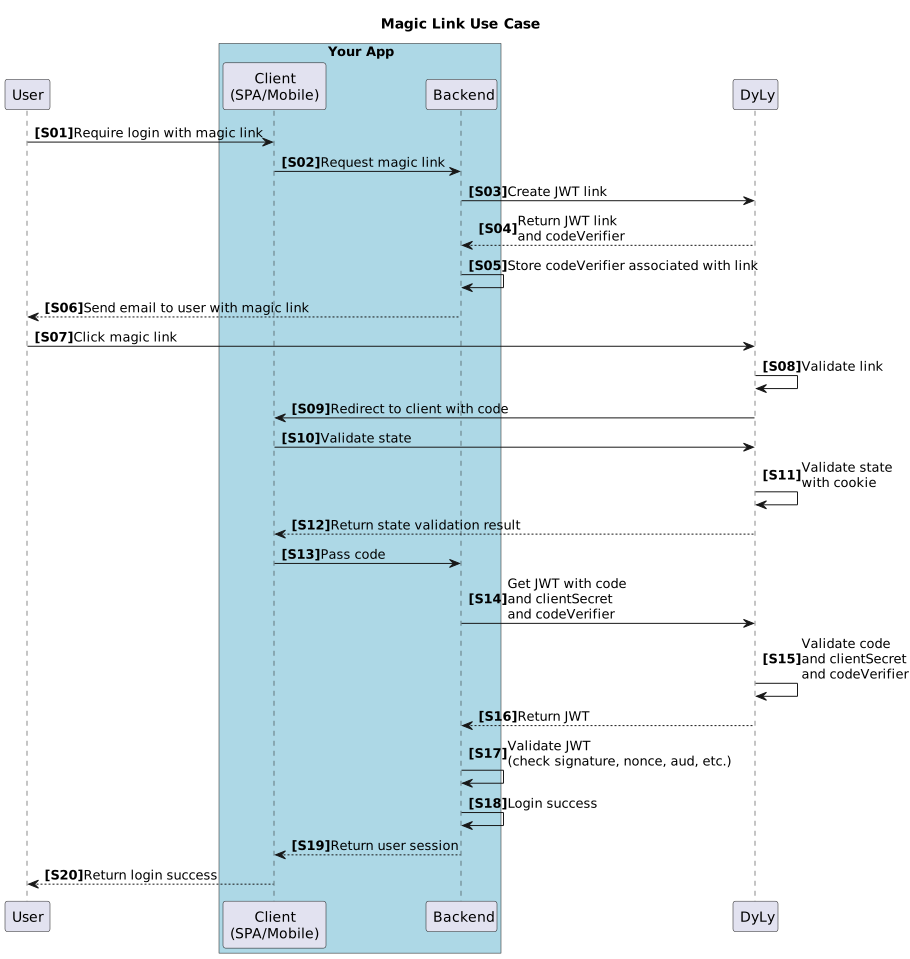
This sequence diagram shows the complete magic link authentication flow from start to finish, including all interactions between the user, your application, DyLy, and email service.
Security Considerations
Threat Model & Mitigations
Threat: Email Interception
- Risk: Attacker intercepts the email containing the magic link
- Mitigation: Short expiration times (5-10 minutes), one-time use
- Additional: Monitor for suspicious login patterns (unusual locations/devices)
Threat: Link Sharing
- Risk: User accidentally shares the link with someone else
- Mitigation: One-time use, key protection, short expiration
- Additional: User education, clear warnings in email
Threat: Phishing
- Risk: Attacker sends fake magic link emails
- Mitigation: Educate users on legitimate domains, use branded emails
- Additional: Implement DMARC/SPF/DKIM for email authentication
Threat: CSRF
- Risk: Attacker tricks user into authenticating as the attacker
- Mitigation: State validation with session cookies
- Additional: Verify IP/user agent consistency (heuristic)
Threat: Replay Attack
- Risk: Attacker reuses a previously valid authorization code or JWT
- Mitigation: One-time authorization codes, nonce validation
- Additional: Track used nonces, short JWT expiration
Threat: Session Hijacking
- Risk: Attacker steals user's session after authentication
- Mitigation: Secure session cookies (httpOnly, secure, sameSite)
- Additional: Session rotation, device fingerprinting, IP validation
Best Practices
✅ Defense in Depth: Use multiple security layers (oneTime + keyProtected + short expiration + state validation)
✅ Minimal JWT Lifetime: 5 minutes is usually sufficient
✅ Link Expiration: 10-60 minutes allows email delivery while limiting exposure
✅ Nonce Validation: Always verify nonce to prevent replay attacks
✅ Audit Logging: Log all authentication attempts for security monitoring
✅ Rate Limiting: Limit magic link requests per email address (e.g., 3 per hour)
✅ Secure Sessions: Use httpOnly, secure, sameSite cookies
✅ Email Security: Implement SPF, DKIM, DMARC for your email domain
Configuration Recommendations
Production Configuration:
{
  "jwtExpiresIn": 300,      // 5 minutes
  "expiresIn": 1800,        // 30 minutes
  "oneTime": true,          // Must be true
  "keyProtected": true,     // Highly recommended
  "flow": "code",           // Always use code flow
  "clientType": "confidential" // Or "public" with PKCE
}
Development Configuration (more lenient for testing):
{
  "jwtExpiresIn": 900,      // 15 minutes
  "expiresIn": 3600,        // 1 hour
  "oneTime": true,
  "keyProtected": true,
  "flow": "code",
  "clientType": "public"
}
Troubleshooting Guide
Common Issues
Issue: "State validation returns INVALID"
Possible Causes:
- State validation called from server instead of browser (no cookie)
- Cookies blocked by browser settings or extensions
- Session expired between click and validation
Solutions:
- ✅ Ensure state validation is called from browser with
credentials: 'include' - ✅ Check browser console for cookie warnings
- ✅ Verify your domain and DyLy domain are properly configured
- ✅ Test with a fresh browser session
- ✅ Consider using IP/UA metadata as fallback (less secure)
Issue: "JWT exchange returns 404"
Possible Causes:
- Link already used (one-time link consumed)
- Link expired
- Invalid authorization code
- Wrong alias used
Solutions:
- ✅ Check link expiration settings
- ✅ Verify authorization code is fresh (not reused)
- ✅ Ensure alias matches the link created
- ✅ Implement retry mechanism (request new magic link)
Issue: "JWT signature verification fails"
Possible Causes:
- Wrong JWKS URL
- Clock skew between systems
- JWT expired
- Corrupted JWT
Solutions:
- ✅ Verify JWKS URL matches your domain:
https://<your-domain>/.well-known/jwks.json - ✅ Check system clocks are synchronized (use NTP)
- ✅ Inspect JWT claims at jwt.io (DO NOT paste real JWTs on public sites!)
- ✅ Ensure JWT hasn't expired (check
expclaim)
Issue: "Users not receiving magic link emails"
Possible Causes:
- Email marked as spam
- Email delivery delays
- Wrong email address
- Email service issues
Solutions:
- ✅ Implement SPF, DKIM, DMARC for your domain
- ✅ Use reputable email service (SendGrid, AWS SES, etc.)
- ✅ Check spam folders
- ✅ Verify email address is correct
- ✅ Monitor email delivery logs
- ✅ Provide a "resend link" option
Issue: "Link expired before user could click it"
Possible Causes:
- Link expiration too short
- Email delivery delays
- User took too long to check email
Solutions:
- ✅ Increase
expiresInto 30-60 minutes - ✅ Keep
jwtExpiresInshort (5-10 minutes) for security - ✅ Provide clear expiration time in email
- ✅ Offer "resend link" functionality
- ✅ Monitor email delivery time metrics
Issue: "Mobile app doesn't preserve session cookie"
Possible Causes:
- HTTP client doesn't support cookies
- Cookie cleared between requests
- Webview and app don't share cookie storage
Solutions:
- ✅ Use a webview for OAuth flow (inherits browser cookies)
- ✅ Configure HTTP client to accept and store cookies
- ✅ Consider fallback to IP/UA validation (less secure)
- ✅ Test cookie persistence in your app
Testing Checklist
Before deploying to production, test these scenarios:
Happy Path
- ✅ User requests magic link
- ✅ Email is received within reasonable time (< 1 minute)
- ✅ Link works on first click
- ✅ User is successfully authenticated
- ✅ Session is created correctly
Security Tests
- ✅ Link cannot be used twice (one-time validation)
- ✅ Expired links return appropriate error
- ✅ State validation detects CSRF attempts
- ✅ JWT signature verification works
- ✅ Invalid nonce is rejected
Error Handling
- ✅ Expired link shows user-friendly error
- ✅ Used link shows appropriate message
- ✅ Invalid state shows security warning
- ✅ Network errors are handled gracefully
- ✅ User can request a new link easily
Cross-Browser/Device
- ✅ Works in Chrome, Firefox, Safari, Edge
- ✅ Works on iOS devices
- ✅ Works on Android devices
- ✅ Works in mobile apps (if applicable)
- ✅ Cookies work across all platforms
Performance
- ✅ Link creation takes < 500ms
- ✅ Email delivery takes < 60 seconds
- ✅ Authentication completes < 2 seconds after click
- ✅ System handles concurrent requests
Additional Resources
- JWT Best Practices
- OAuth 2.0 Security Best Current Practice
- OWASP Authentication Cheat Sheet
- DyLy API Reference
- State Validation API
Next Steps
- Implement Magic Links: Follow this guide to add passwordless authentication to your app
- Review Invitation Links: Learn about implementing invitation links for mobile apps
- Explore JWT Links: Understand more about JWT link types and flows
- API Reference: Dive into the complete API documentation
This approach using a JWT link ensures that the link has been clicked and allows you to obtain signed data (JWT), making it applicable to a wide range of use cases beyond authentication. For example, you can send a link for invitations or when updating user information, and easily implement a flow that proceeds only if the link has been reliably clicked.